Do not treat an IP address, a pass result, or a reported disposition as a complete business decision on its own.
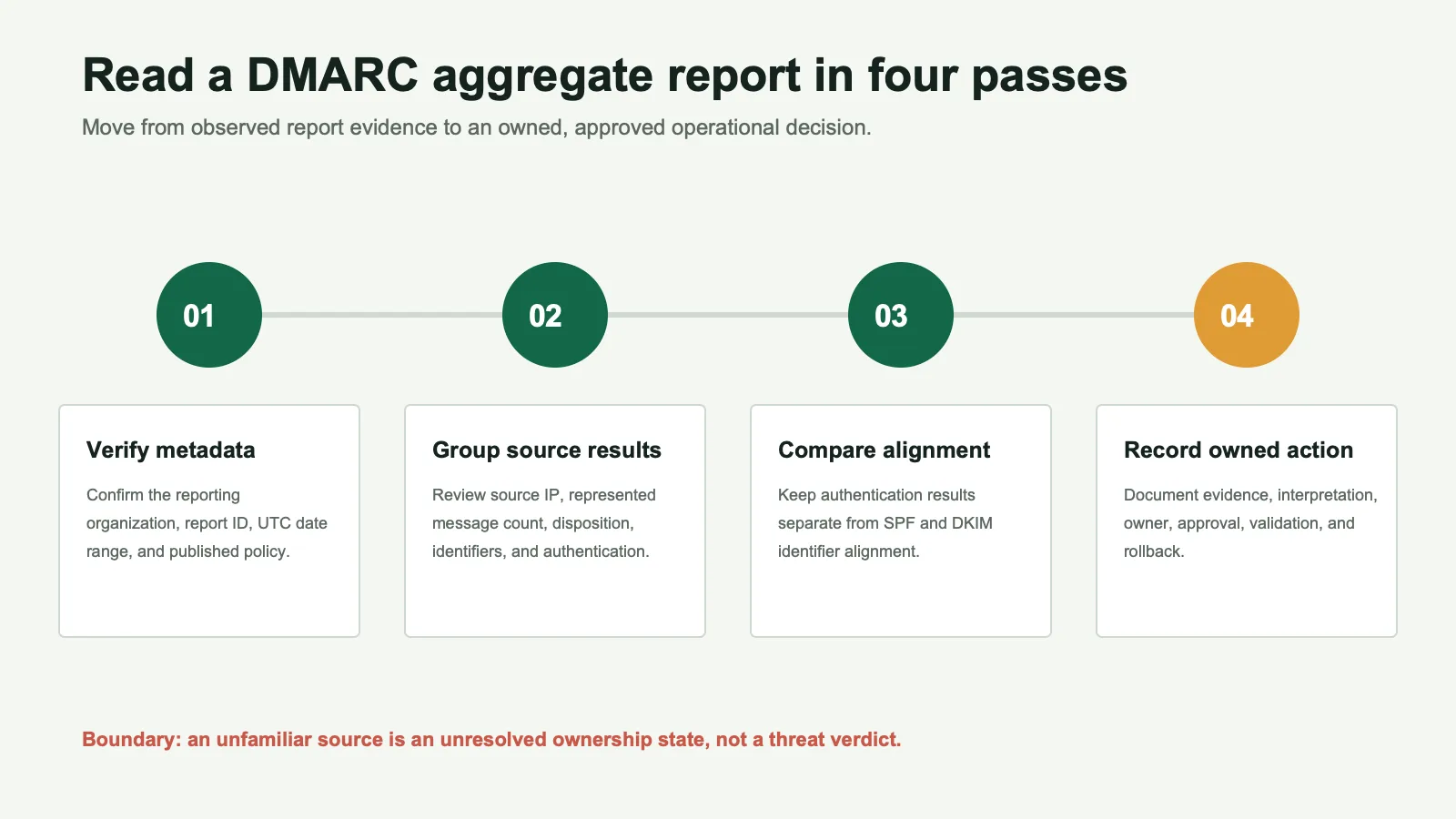
What a DMARC aggregate report tells you
A DMARC aggregate report is an XML document sent by a participating mail receiver to a destination requested through the domain's ruatag. It summarizes message groups observed during a reporting period. Under RFC 9990, the data can include the published policy, source IP, message count, reported disposition, identifiers, authentication results, and DMARC alignment results.
For an MSP, the report can help answer:
- Which source IP addresses sent mail using the client domain?
- How many messages shared each reported source and result?
- Did SPF authenticate, and did its evaluated domain align?
- Did DKIM authenticate, and did a signing domain align?
- What disposition and policy override did the receiver report?
The report does not establish the business owner of a source, prove that a message was malicious or legitimate, show every message sent everywhere, or guarantee final inbox placement.
Start with the report metadata
Do not begin with the largest red number in a dashboard. First verify what the report covers and whether it belongs in the review set.
Reporting organization and report ID
org_name: the organization that generated the report.email: the contact supplied by the generator.report_id: the report identifier.error: any reported policy-processing problem.generator: optional generator and version information.
Use the reporting organization and report ID together when deduplicating files. A repeated filename alone is not a reliable key.
Date range and published policy
The date_range uses Unix timestamps and describes the UTC reporting period. It is not necessarily the first and last observed message. Then inspect policy_published, including the domain,p, optional subdomain policies, and alignment modes.
A report generated under p=none does not prove that a stronger policy is safe. The report contributes evidence; it is not the approval.
Read source results and message counts
Each record represents a tuple of source, policy result, identifiers, and authentication results. Its count is the number of represented messages, not a count of people, threats, campaigns, or business systems.
| Field | Synthetic example | Record state |
|---|---|---|
| Observed source | 192.0.2.44 | Report evidence |
| Header From | client-a.example | Report evidence |
| Likely service | Example CRM | Inference to verify |
| Business owner | Marketing operations | Client-confirmed fact |
| Proposed action | Align DKIM before policy review | Decision requiring approval |
Keep three layers distinct:
auth_results: underlying SPF and DKIM authentication.policy_evaluated/spfanddkim: DMARC identifier-alignment outcomes.disposition: the receiver's reported policy disposition.
Check SPF and DKIM alignment
DMARC checks whether an authenticated SPF or DKIM identifier aligns with the domain in the visible From field. Authentication and alignment are related, but they are not the same test.
For example, SPF may authenticate bounce.vendor.example while the visible domain is client-a.example. That path may fail alignment. A DKIM signature using client-a.example can still authenticate and align, allowing DMARC to pass through DKIM.
Under RFC 9989, a DMARC pass needs at least one supported authentication mechanism to produce an aligned authenticated identifier. Both mechanisms do not need to align.
Annotated synthetic aggregate record
This fragment uses reserved example addresses and domains. It shows field relationships and is not a customer report.
<feedback xmlns="urn:ietf:params:xml:ns:dmarc-2.0">
  <version>1.0</version>
  <report_metadata>
    <org_name>Example Receiver</org_name>
    <email>dmarc-reports@receiver.example</email>
    <report_id>client-a.example-2026-08-18</report_id>
    <date_range>
      <begin>1786924800</begin>
      <end>1787011200</end>
    </date_range>
  </report_metadata>
  <policy_published>
    <domain>client-a.example</domain>
    <p>none</p>
    <adkim>r</adkim>
    <aspf>r</aspf>
  </policy_published>
  <record>
    <row>
      <source_ip>192.0.2.44</source_ip>
      <count>420</count>
      <policy_evaluated>
        <disposition>none</disposition>
        <dkim>pass</dkim>
        <spf>fail</spf>
      </policy_evaluated>
    </row>
    <identifiers>
      <header_from>client-a.example</header_from>
      <envelope_from>bounce.vendor.example</envelope_from>
    </identifiers>
    <auth_results>
      <dkim>
        <domain>client-a.example</domain>
        <selector>mail</selector>
        <result>pass</result>
      </dkim>
      <spf>
        <domain>bounce.vendor.example</domain>
        <scope>mfrom</scope>
        <result>pass</result>
      </spf>
    </auth_results>
  </record>
</feedback>- The receiver grouped 420 messages from
192.0.2.44. - Both mechanisms authenticated in this synthetic record.
- DKIM aligned with the Author Domain; SPF did not.
- DMARC can pass through the aligned DKIM result.
- The source still needs a confirmed owner and authorization state.
rua aggregate reports and ruf failure reports
| Tag | Report | Use | Boundary |
|---|---|---|---|
rua | Aggregate | Source, authentication, alignment, policy, and disposition trends | Does not contain a complete ownership decision |
ruf | Failure | Targeted diagnosis when a receiver sends it | Can expose headers, content, PII, or other non-public data |
Failure reports are subject to receiver policy, format support, destination verification, and privacy controls. Do not promise that every receiver will send them. See RFC 9991.
Investigate unknown sending sources
An unknown source is an unresolved ownership state, not a threat verdict.
- Preserve source, count, identifiers, results, receivers, and date range.
- Use inventories, DNS, selectors, return paths, and vendor records to form a hypothesis.
- Ask the client or MSP owner to confirm the system and business purpose.
- Record confidence and the evidence supporting the assignment.
- Do not recommend blocking solely because a source was unfamiliar.
Classify traffic as authorized, unauthorized,unresolved, or obsolete only with the corresponding decision evidence. Keep unauthorized distinct from malicious.
Turn failures into owned remediation decisions
Create one action record per material issue:
| Evidence | Source, count, identifiers, results, receivers, and date range |
|---|---|
| Interpretation | Likely cause, confidence, and alternatives considered |
| Owner | MSP engineer, client team, or vendor contact responsible for the next step |
| Change | The narrow SPF, DKIM, routing, inventory, or policy action being considered |
| Approval | The person authorized to approve the production change |
| Validation and rollback | Evidence that will confirm success and the response to an adverse effect |
Do not increase a percentage after a fixed number of clean days. The current DMARC specification marks pct historic. Use explicit evidence, exception closure, authorization, validation, and rollback planning instead.
Create a client-ready DMARC summary
A useful summary is short because its supporting evidence is organized, not because uncertainty is hidden.
- Scope: domains, report period, receivers, and coverage limitations.
- Observed state: policy, represented messages, alignment, unresolved sources, and open items.
- Completed decisions: confirmed owners, validated remediation, and closed exceptions.
- Decisions needed: exact approval, consequences, and rollback considerations.
- Review state: ready for policy review, blocked, or continue observation, with criteria.
- Next review: owner, date, and evidence expected.
Avoid claims such as "no threats detected," "deliverability improved," "all spoofing blocked," or "enforcement ready" when the aggregate evidence and approval record do not establish them.
Sources and methodology
The current RFCs control protocol explanations. Ubersuggest, search results, competitor pages, and community discussions informed audience questions and organization only; they do not substantiate technical or product claims. AI output was not used as evidence.